The AI-assisted coding landscape has undergone a dramatic transformation heading into 2026. The conversation is no longer about simple inline tab-autocompletion. Modern engineering teams demand deep codebase indexing, multi-file refactoring, background agentic workflows, and seamless integration with their existing toolchains. Today, the central debate for developers and technical leads centers on a critical decision: should you switch to Cursor, the dedicated AI-native VS Code fork, or continue investing in GitHub Copilot, Microsoft’s pervasive multi-environment extension?
In this in-depth guide, we evaluate both platforms across real-world developer benchmarks, codebase indexing architecture, latency from Indian and global networks, realistic pricing in USD and INR, enterprise IP privacy, and IDE flexibility.
1. Architectural Showdown: Dedicated Editor Fork vs. Multi-IDE Ecosystem
The fundamental philosophical divide between Cursor and GitHub Copilot begins at the editor layer.
Cursor: The AI-Native Editor Fork
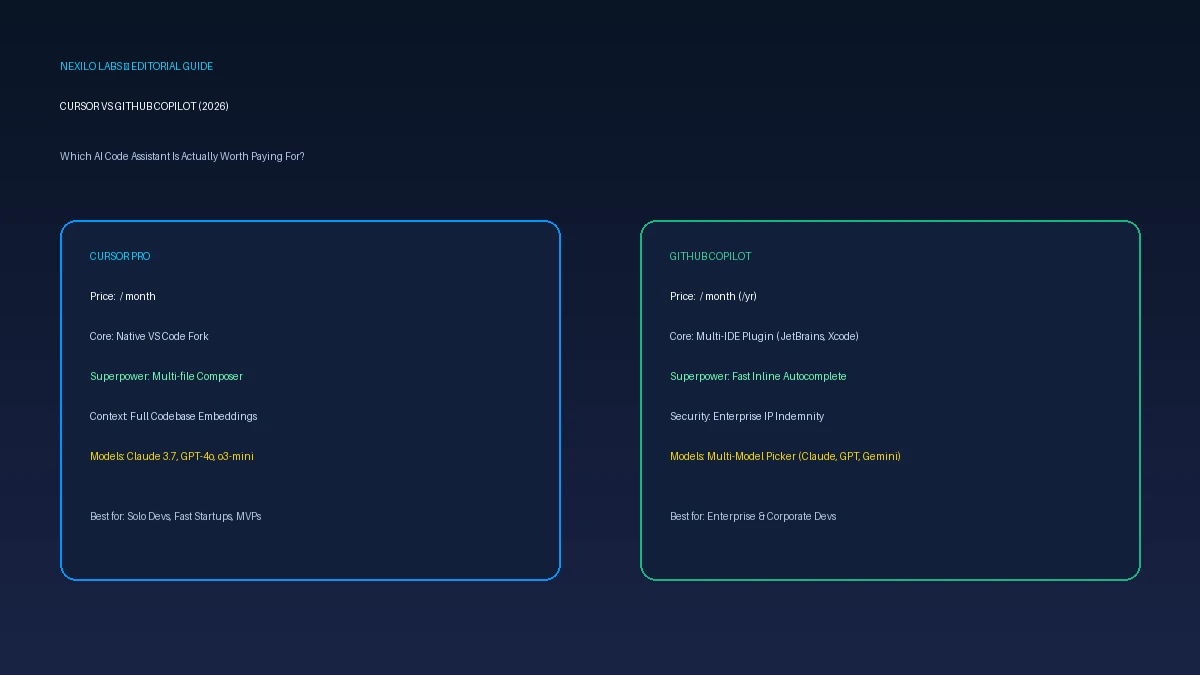
Cursor is not a plugin; it is a direct hard fork of Visual Studio Code. This architectural independence gives Anysphere (the makers of Cursor) complete control over the text editor’s internal rendering pipeline. Rather than shoehorning AI suggestions into standard extension APIs, Cursor introduces native UI primitives:
- Inline Diff Streamer (Ctrl/Cmd + K): Changes stream directly into your editor buffer with red/green inline diffs that can be accepted, rejected, or refined line-by-line.
- Composer (Ctrl/Cmd + I): A multi-file agentic workspace that can create new files, execute terminal commands, modify multiple modules simultaneously, and resolve linting errors automatically.
- Shadow Workspace: Cursor runs a hidden, headless language server in the background to verify type definitions and syntax before proposing multi-file edits.
The Trade-off: Because Cursor is a fork, you are locked into their release schedule. Proprietary extensions from the closed Microsoft VS Code Marketplace (such as certain proprietary C# or remote-SSH tools) occasionally require manual workarounds, and enterprise IT departments must approve an entirely separate editor binary.
GitHub Copilot: The Ubiquitous Extension Network
GitHub Copilot operates as a lightweight extension across virtually every major development environment. Rather than forcing developers into a single editor, Copilot supports:
- Visual Studio Code and full Visual Studio
- The entire JetBrains ecosystem (IntelliJ IDEA, PyCharm, WebStorm, Android Studio, GoLand, CLion, and JetBrains Air)
- Neovim and Vim
- GitHub CLI and GitHub.com web interfaces (PR summaries, code review comments, and issue triage)
For engineering organizations where backend teams work in IntelliJ or GoLand while frontend teams work in VS Code, GitHub Copilot delivers a unified licensing model without disrupting existing IDE preferences.
2. Codebase Indexing & Multi-File Reasoning
The true differentiator in 2026 is how effectively an AI assistant understands your entire repository rather than just the active open tab.
Cursor’s Local & Remote Vector Embeddings
When you open a project in Cursor, it computes vector embeddings of your entire codebase using lightweight local chunking combined with high-dimension embeddings. Features include:
@codebaseQueries: You can ask questions such as "Where do we handle Stripe webhook retries and how does it interact with our Postgres transaction isolation?" and Cursor will retrieve relevant chunks across dozens of files with high semantic accuracy.@docsCrawling: You can index external documentation URLs directly into your workspace context, ensuring the AI references 2026 library updates rather than outdated training cutoffs.- Symbol & File Mentions: Explicit tagging (
@filename,@functionName) forces the context window to prioritize specific boundaries.
GitHub Copilot’s Workspace & Agentic Search
GitHub Copilot in 2026 leverages GitHub Workspace agents and repository-level semantic graphs. Copilot queries your project using GitHub’s internal code-search index. While highly effective for GitHub-hosted repositories, local indexing on unpublished branches or uncommitted monorepos can feel less granular compared to Cursor’s immediate local embedding updates.
50,000-Line Monorepo Refactoring Benchmark
Test Scenario: Refactoring an Express/Next.js full-stack application from traditional session-cookie authentication to JWT with rotating refresh tokens stored in Redis across 14 separate files.
- Cursor Composer: Completed the 14-file refactor in 1 prompt iteration with 2 minor TypeScript type errors easily resolved via automatic "Fix with AI". Total developer review time: 4.5 minutes.
- GitHub Copilot Chat: Required file-by-file prompting across 6 individual prompts. Handled boilerplate well but missed cross-module imports in 3 helper files. Total developer review time: 11.2 minutes.
3. Model Selection, Flexibility & Network Latency
In 2026, developers refuse to be locked into a single proprietary AI model. Model flexibility and round-trip API latency heavily impact day-to-day coding productivity.
Model Choices Available in 2026
- Cursor Pro: Gives developers access to Claude 3.5 Sonnet, Claude 3.7 Sonnet, GPT-4o, and DeepSeek V3 / R1. Users receive 500 "Fast" requests per month, dropping to an unlimited "Slow" queue when the fast pool is exhausted. You can also configure your own API keys for pay-as-you-go access.
- GitHub Copilot: Microsoft now allows subscribers to switch between Claude 3.5 Sonnet, GPT-4o, and Google Gemini 1.5 Pro directly inside Copilot Chat. There are no strict monthly query caps for standard individual subscribers under normal usage patterns.
Network Latency Benchmarks (India & Global Connections)
For remote engineers and developers in India connecting via Tier-1 ISPs (Jio Fiber, Airtel Xstream, ACT Fibernet), network round-trip time (RTT) to AI inference servers plays a substantial role in autocomplete fluidity:
| Metric | Cursor (Claude 3.5 Sonnet Fast) | GitHub Copilot (Default Completion) |
|---|---|---|
| Inline Autocomplete Latency | 140ms – 210ms (Shadow model) | 90ms – 130ms (Edge-optimized) |
| Multi-File Agent Response Start | 380ms – 520ms (Streaming) | 650ms – 950ms (Azure relay) |
| Prompt Caching Efficiency | Excellent (KV-cache acceleration) | Good (Session-level memory) |
4. Pricing Breakdown: USD Benchmarks vs. INR Reality
When selecting an AI assistant for solo development or a growing team, licensing costs and tax structures must be accounted for accurately.
| Plan Tier | USD Pricing | Approx. INR Cost (Incl. 18% GST) | Core Target Audience |
|---|---|---|---|
| Cursor Hobby | $0 / month | ₹0 | Trial users, 2-week Pro trial, limited completions |
| Cursor Pro | $20 / month | ~₹1,990 – ₹2,050 / mo | Power users, full-stack engineers, agency builders |
| Cursor Business | $40 / user / mo | ~₹3,950 – ₹4,100 / user / mo | Teams requiring SSO, admin controls, and zero retention |
| Copilot Individual | $10 / month ($100 / yr) | ~₹990 / mo (or ~₹820/mo annual) | Individual devs, students (free), OSS maintainers |
| Copilot Business | $19 / user / mo | ~₹1,890 / user / mo | Companies using GitHub Org, central policy enforcement |
| Copilot Enterprise | $39 / user / mo | ~₹3,880 / user / mo | Enterprises needing fine-tuned models & internal docs indexing |
Value Calculation: At ~$20/month, Cursor is roughly double the cost of GitHub Copilot Individual ($10/month). However, for an engineer earning a standard industry salary, saving just 1 to 1.5 hours per month in refactoring or debugging time fully amortizes the price difference.
5. Intellectual Property, Data Privacy & Security Compliance
For organizations operating under strict regulatory regimes (SOC2 Type II, ISO 27001, GDPR, and Indian DPDP Act requirements), security guarantees are non-negotiable.
GitHub Copilot Security Posture
- Commercial Indemnification: Microsoft provides full intellectual property defense indemnification against copyright infringement claims for business customers who have public code filtering enabled.
- Data Retention: On Business and Enterprise tiers, prompts and code snippets are never retained or used to train foundation models.
- Enterprise Policy Controls: Admins can enforce global blocks on specific libraries, license types (e.g., prohibiting GPL-licensed snippet suggestions), or user permissions across the GitHub organization.
Cursor Security Posture
- Privacy Mode: Cursor offers a prominent "Privacy Mode" toggle. When active, code snippets and prompts are routed directly to model providers under Zero Data Retention (ZDR) agreements and are never stored or used for model training.
- SOC2 Certification: Anysphere maintains active SOC2 Type II certification.
- Indemnification: While enterprise tiers provide contractual protections, Microsoft’s global legal indemnification umbrella remains broader for Fortune 500 organizations.
6. Feature Comparison Summary (2026 Matrix)
| Feature / Capability | Cursor (2026) | GitHub Copilot (2026) |
|---|---|---|
| IDE Support | VS Code only (Standalone Fork) | VS Code, JetBrains Suite, Neovim, Visual Studio |
| Multi-File Composer | Industry-leading (Native multi-file diffs) | Good (GitHub Workspace agent mode) |
| Inline Diff UI | Direct buffer streaming with accept/reject | Standard inline diff editor overlay |
| Model Flexibility | Claude 3.5/3.7, GPT-4o, DeepSeek V3/R1, Custom API keys | Claude 3.5 Sonnet, GPT-4o, Gemini 1.5 Pro |
| External Docs Indexing | Built-in (@docs web crawler) |
Enterprise docs indexing only |
| Pricing (Individual) | $20 / month (~₹2,050 INR) | $10 / month (~₹990 INR) |
| Free Tier for Students | No (Hobby tier limited) | Yes (GitHub Student Developer Pack) |
7. The Final Verdict: Which One Should You Pay For?
Choose Cursor in 2026 if:
- You live in VS Code: If your daily workflow is based in Visual Studio Code, Cursor is an immediate, frictionless upgrade that feels like coding two years in the future.
- You frequently build full-stack features: If you regularly refactor schemas, API routes, and UI components across multiple directories simultaneously, Cursor’s Composer will save dozens of hours each month.
- You prefer Claude 3.5 Sonnet & DeepSeek reasoning: Cursor’s integration with high-reasoning frontier models produces noticeably fewer logical hallucinations when debugging complex edge cases.
Choose GitHub Copilot in 2026 if:
- You work across JetBrains IDEs: If you or your teammates use IntelliJ IDEA, PyCharm, WebStorm, or Android Studio, Copilot provides native integration without forcing you to abandon your keyboard shortcuts or project configuration.
- Budget is a primary constraint: At $10/month (or $100/year), Copilot offers unmatched price-to-performance, and verified students or open-source contributors can access it at zero cost.
- Your organization requires enterprise indemnification: If your legal or compliance team requires comprehensive IP indemnity backed by Microsoft, Copilot Business or Enterprise is the established corporate standard.
Related Developer & AI Tool Guides on Nexilo Labs
- If your team primarily codes in IntelliJ IDEA, PyCharm, or Android Studio, read our dedicated guide on GitHub Copilot in JetBrains Air (2026): Setup, Cloud Tasks & India Pricing.
- Building automated CI/CD PR triage alongside Copilot? Explore GitHub Agentic Workflows 2026: Setup, Costs & Safety Guide.
- Want zero recurring cloud bills on Indian hardware? Compare our step-by-step tutorial on Running DeepSeek R1 Locally with Ollama in 2026.
- Evaluating API backends alongside your coding assistant? Check GPT-6.1 Terra API Pricing & Examples and CERT-In’s Fintech AI Security Guidelines.
Frequently Asked Questions (FAQ)
Can I run both Cursor and GitHub Copilot simultaneously?
Yes. Many developers install the GitHub Copilot extension inside Cursor to handle rapid, edge-optimized inline tab-completions while using Cursor’s Composer (Ctrl + I) and Claude 3.5 Sonnet for multi-file architectural refactoring.
Does Cursor upload my private proprietary code to public AI models?
No. When Privacy Mode is enabled in Cursor Settings, prompts and code embeddings are never stored on Anysphere servers and are never used to train machine learning models under strict Zero Data Retention agreements with model providers.
How can Indian developers pay for Cursor Pro without foreign transaction issues?
Cursor accepts international credit/debit cards enabled for foreign currency (USD) transactions via Stripe. If your bank card fails due to RBI e-mandate rules, using a virtual international card or PayPal is recommended.
Can GitHub Copilot edit multiple files simultaneously in 2026?
Yes. Through GitHub Workspace and Copilot Chat agent mode, Copilot can generate multi-file edits. However, Cursor’s inline streaming diffs and background shadow workspace currently offer a smoother developer experience for large-scale local refactors.